Taking time to size a valve correctly saves you time, money and yourself a headache!
Picking the right size leads to performance
Our goal is to find the valve with the best control for your specific application. The Cv, or coefficient of flow of the valve, plays a big part in the valve’s performance. A valve that is sized correctly has accurate flow control, lasts beyond its expected life span and does not leak.
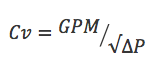
All you need to size a valve is the GPM and pressure drop! Calculate the Cv with this equation:
CV = coefficient of flow, GPM = flow rate in gallons per minute and ∆P = differential pressure
Selecting the wrong size results in complications
When a valve is too small, you won’t get enough flow, and the system will be forced to compensate by raising the head pressure of the pump. This causes higher differential pressure across your valve. The sudden drop in pressure causes cavitation and affects the life of the valve. The vibration and turbulence wears out the seals, which results in leaks.
Did you know most engineers oversize a pump by as much as 15% to cover for this type of mistake? Read more
Big Bertha took some man power, and machine power, to transport.
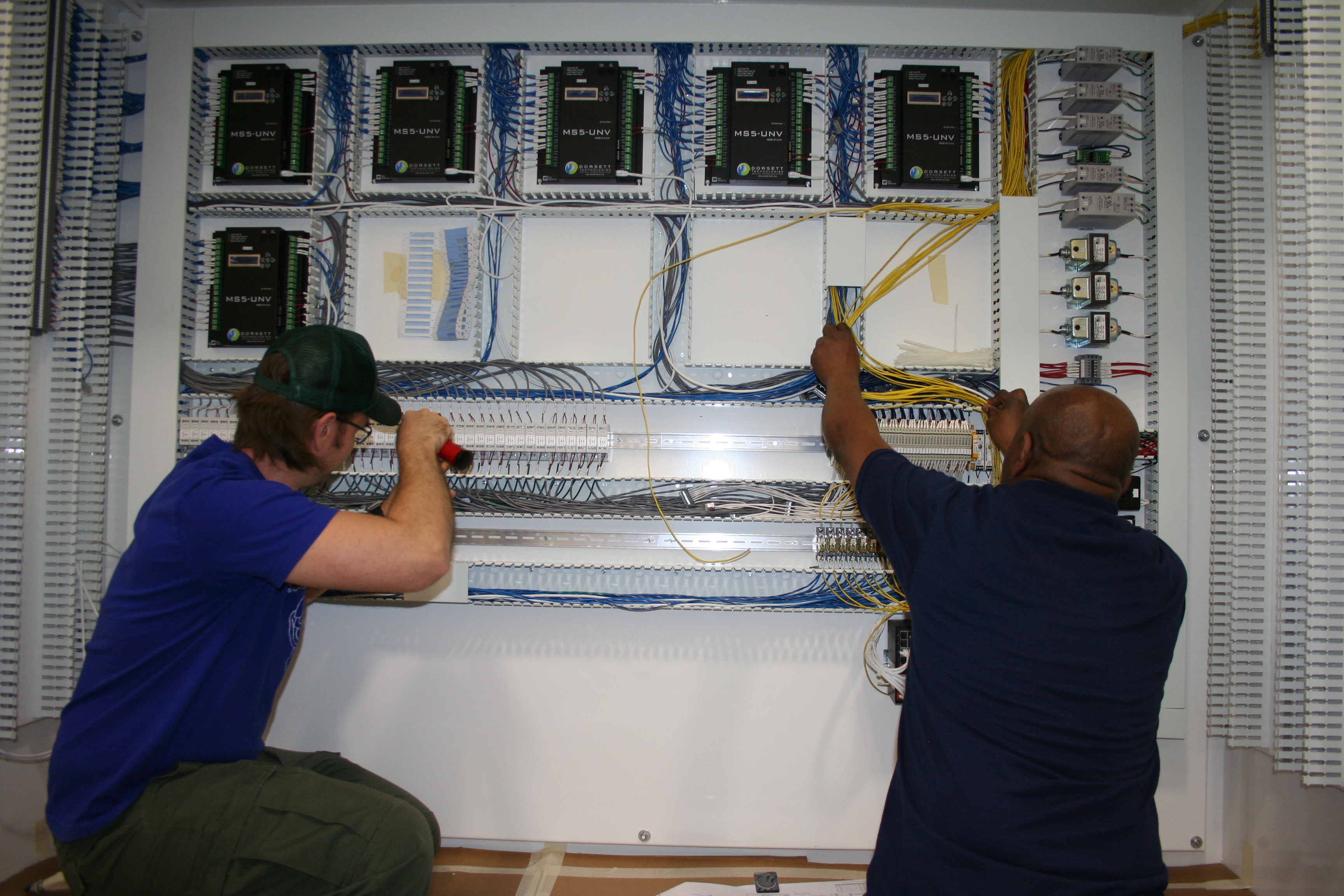
Kele has completed its largest scale panel to date through our own custom panel shop. Those at Kele lovingly referred to “her” as “Big Bertha” during the build. Dorsett Technologies of North Carolina partnered with us for a project to automate water pump functionality for their customer. Their 96”x72” panel was custom for several reasons, and we were glad to have them select Kele. Through our supplier relationships and white glove service, Dorsett received their gigantic panel without incident and had a completely successful install. Kele was chosen to create Bertha because:
We conduct a 35-point inspection on all plans before the build.
Our reputation for a cleanly wired panel proceeds us.
We offer white glove shipping provisions.
Our ability to incorporate specialty features not currently carried in our inventory.
Kele, specializes in special requests and getting a job done right. Dorsett Technologies expressly selected Kele for our clean wiring, ability to incorporate special parts and features, and our ability to customize the shipping. Their panel, a 96” X 72” enclosure complete with 6 controllers and all of the peripherals was specially constructed for their water pump station project. Additionally, Kele received and incorporated a touchscreen on the outside, mounted in the door. Dorsett has a close relationship with their enclosure partners, Austin Enclosures Co. Kele doesn’t typically carry their materials, but what the customer wants, the customer gets! Kele’s panel team worked with Austin Enclosures to meet the job’s specifications and received the large enclosure to complete the build. This was the first of series of panels that were needed.
in-house engineers and technicians check and assess the panel.
Since Kele had not done a 5’x 8’ panel that weighed 1,500 lbs. before, we sat down to establish what made this extraordinary. Our number one concern: SAFETY.
“The safety of our techs and taking care of the customers’ product are my utmost concern,” Lisa Bennett, Panel Shop Manager expressed. She and the engineers met with Yarbrough, a global rigging supplier, to source the best way to maneuver this large panel. Yarbrough helped to design and recommend a solution that was scalable beyond this project for larger or smaller panels that would require the use of a forklift. Once the rigging was ordered, we were ready to get to work.
Kele pre-checks all plans that are received to ensure that the plans we’ve been sent will actually work and contain everything needed to execute the control and automation processes that the customer intends and needs. Over 98% of our plans received require some sort of adjustment. That’s the beauty of working with Kele. We look ahead for you to avoid costly delays, and possible malfunctions on the jobsite. Our team, including Justin Whittman, Mack Moss and Ron Shields flipped their perspective and wired the entire panel vertically, as opposed to horizontally, as is typically done for smaller panels on a workbench. Their wirework was just as clean and nice as always. During the bidding process, Dorsett noted that our clean wiring, in addition to our in-stock inventory were the key reasons they wanted to work with us on this project. Once the panel was wired, our techs and inspection team tested it twice to ensure that it would be power-ready when it arrived to the installation site. Kele does this testing for EVERY panel that leaves our facility. Barring any crazy mishaps in transit, all of Kele’s panels should be able to be wired on site and work properly without incident.
keeping safety in mind, we came up with a plan to move this big beauty
This brings us to the next exciting challenge of this project. TRANSIT! How were we going to make sure once she was created, that Bertha would arrive to North Carolina without a scratch? Kele has relationships the heavy hitters, including FedEx and UPS. We’re located in Memphis, TN, with both of their hubs in our backyard. We also foster strong relationships with several LTL carriers to make sure that all of our customers’ needs are met using the carriers they prefer. For this shipment, our partner was AAA Cooper Transportation. We worked with the regional manager and the driver to make sure this was the first shipment on the truck, and the last load off. With a panel of this size, we wanted to make sure that it wasn’t overly moved or touched for safety concerns, as well as to avoid damages in shipment. To better stabilize this panel, we used special lag bolts and strapping to secure it directly to the pallet. The shipment traveled from Memphis, TN to the site in North Carolina within two days, and Dorsett Technologies reported a safe arrival.
Open an HVAC control panel, and you’re likely to find at least one relay mounted inside. Sometimes you find lots of relays! Even though relay technology has been around since the 1800s, there is still a need for relays in control panels.
What components make up a relay? How are relays typically shown in wiring diagrams? What functions can a relay perform? Stay tuned for some answers…
What Components Make Up A Relay?
A relay is constructed from the following components:
Electromagnet (coil of wire with metal core)
Armature (arm that moves when attracted by the energized electromagnet)
Spring (keeps the armature retracted when the electromagnet is de-energized)
Contact(s) (one or more electrical contacts that open or close when the armature moves)
Electrical Terminals (so you can make connections to the electromagnet and contacts)
How Does It Work?
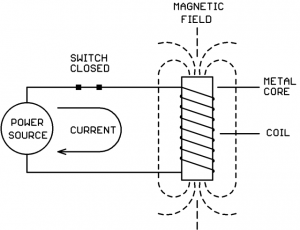
You might have built an electromagnet in high school science class and used it to pick up small metal objects. An electromagnet is a coil of wire wound around a metal core. When the coil of wire is hooked to an electrical power source and current flows through the coil, a magnetic field is produced which surrounds the coil and the core:
While the electromagnet is energized, any metal objects which come close will be physically pulled towards core.
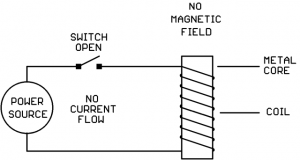
When the switch is opened, the current flow stops and the magnetic field disappears. When the magnetic field disappears, nearby metal objects are no longer attracted to the core:
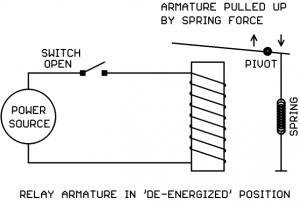
We now place a pivoted metal arm (armature) above the electromagnet, and we connect a spring to keep the armature pulled away from the electromagnet under “normal” (electromagnet de-energized) conditions:
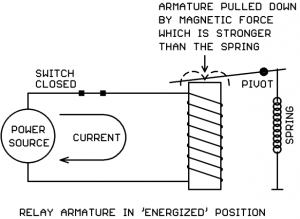
If we now energize the coil, the magnetic field will overcome the spring force and pull the armature down:
So… we have an armature which we can move up and down by de-energizing or energizing the electromagnet coil. What do we do with it?
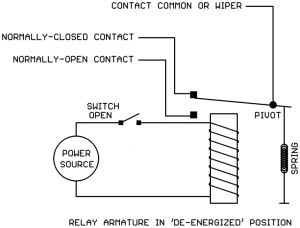
We use the moving armature to open and close electrical contacts which are separate from the coil circuit. We can do it like this:
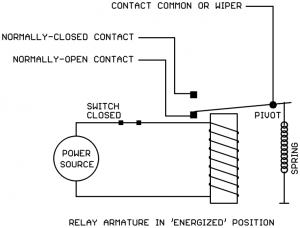
In this example, we’re using the metal armature itself as the “Common” or “Wiper” for a double-throw switch. The tip of the armature makes contact with one of two possible points depending on the position of the armature.
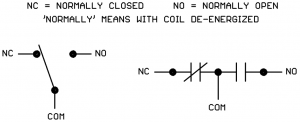
When the relay is de-energized, the armature is up and the wiper makes connection with the “Normally Closed” (NC) contact.
When the relay is energized, the armature is down and the wiper makes connection with the “Normally Open” (NO) relay contact:
This example relay would be known as a “Single Pole, Double Throw” (SPDT) or “1 Pole, Double Throw” (1PDT) relay. It has one set of contacts (1 Pole) with both Normally Open and Normally Closed (Double Throw) connections.
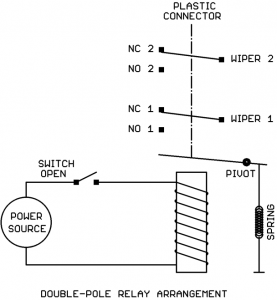
Relays can have more than one set of contacts (poles). In the next example, the metal armature is not part of the electrical circuit but instead moves a plastic connector that activates two sets of contacts:
This would be known as a “Double Pole, Double Throw” (DPDT) or “2 Pole, Double Throw” (2PDT) relay.
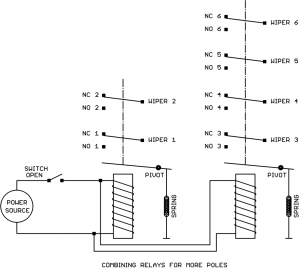
The number of poles (contact sets) can be expanded (3PDT relays, 4PDT relays etc.). Typically 4 poles is the largest relay we would see in an HVAC control panel. If you need more than 4 poles in a relay, you would probably use two relays with the coils wired together in parallel. Shown below are a DPDT relay and a 4PDT relay wired together to create 6PDT relay action:
Electrical Ratings of a Relay
The coil of a “classic” relay (no electronics) is typically rated for a specific voltage and either AC or DC operation but not both.
There are some modern relays (like Functional Devices “Relay In A Box”) that contain electronic circuits that allow the coil to operate over a range of voltages and either AC or DC operation.
If in doubt, the relay’s datasheet should clearly spell out the acceptable voltage range for the coil and whether it’s AC only, DC only, or AC/DC compatible.
Relay coils are generally tolerant of some variation in the coil voltage, a typical datasheet specification is 80% – 120% of rated coil voltage. So if a 24V transformer is “running a little hot” (putting out maybe 27V) or there is a bit of voltage drop in the coil connecting wires (maybe the coil is only getting 22V) the relay will still function just fine.
The relay contacts will have ratings for the maximum voltage allowed and the maximum current allowed. Sometimes there are multiple ratings depending on the type of load being switched (for a motor load sometimes the contacts are rated in horsepower for example). The circuit being switched by the contacts should not put more voltage or current on the contacts than allowed by the datasheet.
Relay Symbols Used in Wiring Diagrams
The relay coil may be drawn several different ways:
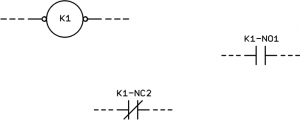
The relay contacts are typically shown one of two ways:
Relays go by several possible names on an electrical drawing:
‘R’ (not a great idea since resistors can have this designation too)
‘RL’ (better)
‘RLY’ (better still)
‘K’ (Where did this come from? We don’t know. But it’s widely used!)
If there are multiple relays, the name will be followed by a number or a letter as in RLY1, RLY2, RLY3 or RLYA, RLYB, RLYC. There might be a hyphen (-) between the name and number or letter too. There is no specific standard on how relays must be named.
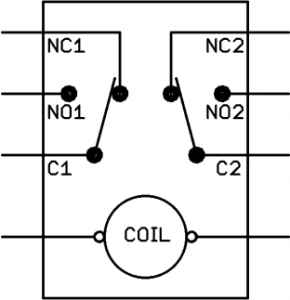
Sometimes the relay is shown as a single assembly with coil and contacts arranged in a rectangle:
But sometimes the coil and the contacts are scattered around the drawing:
Relay Terminal Numbering
Unfortunately there does not seem to be a standard for the terminal numbering on relays.
Most of the relays we use in HVAC panels plug into a base socket. The pins/blades of the relay have assigned numbers and then the bases they plug into have assigned numbers on the screw terminals. If the same brand of relay and base are used together, the blade numbers usually match the terminal numbers on the base. If, however, different brands of relay and base are used together, the blade numbers may not match the base terminal numbers even though the two parts are physically compatible (example: IDEC SH3B-05 relay plugged into Omron PTF11A base). It’s a good idea to use the same brand of relay and base to avoid confusion.
Some electronic relays such as Functional Devices “Relay In A Box” have color-coded flying leads rather than screw terminals. Consult the device datasheet to determine the function of each color-coded lead.
Functions a Relay Can Perform
So what useful functions can a relay perform?
Use a low voltage and/or low current signal (on the coil) to switch a large voltage and/or large current circuit (on the contacts).
Use a DC signal (on the coil) to switch an AC circuit (on the contacts) or vice-versa.
Use one signal (on the coil) to switch multiple circuits (multi-pole contacts).
Invert the sense of a signal (using the Normally Closed contact).
Use a signal from one circuit (on the coil) to switch another circuit (on the contacts) where the two circuits are not allowed to have any direct electrical connection.
Use one signal (on the coil) to switch between two alternate loads (on the contacts).
Various combinations of the above.
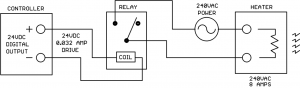
The example below demonstrates a relay performing a combination of several of the above functions. A low voltage, low current control signal from a controller is switching a high voltage, high current load on and off. The relay is also allowing a DC control signal to switch an AC load. There is also electrical isolation between the drive circuit and the load circuit so that the controller is protected from the high voltage 240V power source:
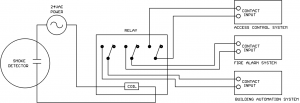
In the next scenario a smoke detector signal is being sent to three different systems simultaneously while maintaining isolation between the systems to make sure there is no unintended interaction between the systems:
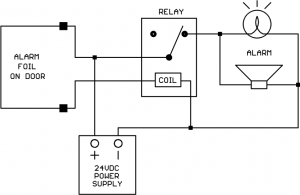
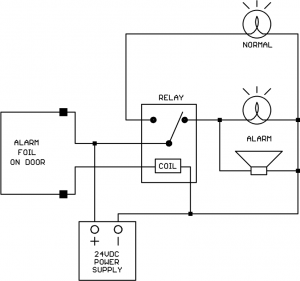
Here is an application where we want to reverse the sense of an electrical signal. We have a foil alarm loop glued to a glass door. When the foil is intact (current flowing through foil) we want to hold off the Alarm light and horn. When the foil is broken (current flow stops) we want to energize the Alarm light and horn. We can get the reverse action we want by using the Normally Closed contact on the relay:
Let’s see how we can use both the N.O. and N.C. contacts to get “alternate action” between two loads. We decide that in addition to the ALARM light, we also want a NORMAL light for our alarm circuit that is on when the foil connection is intact. So we want the action of the NORMAL and ALARM lights to alternate, one or the other is on at any time, but never both at the same time. We can get this alternate action by adding the NORMAL light to the N.O. relay contact:
You may begin to see how versatile relays are. Even with all the high-tech electronics in control panels, relays will be with us for a long time to come. The operation is easy to understand and they can be used for many different applications.
Magnetic Latching Relays
There is a special class of relays known as “magnetic latching relays.” These relays contain one or more small permanent magnets which hold the armature in the last commanded position when the coil drive is removed. When a coil drive signal is applied, the magnetic field from the coil is stronger than the permanent magnets and can thus move the armature to the opposite position in spite of the permanent magnet’s presence.
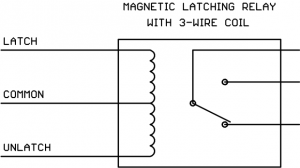
Magnetic latching relays must have two coil drive commands, Latch and Unlatch. Some relays accomplish this with two separate coil windings and two command leads:
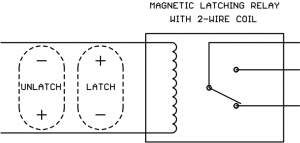
Other magnetic latching relays have just two coil wires, but the polarity of the applied DC drive determines whether the command is Latch or Unlatch:
The Latch and Unlatch drive signals are typically meant to only be momentary, you normally would not leave either signal on the coil continuously.
Magnetic latching relays are frequently used in lighting circuits. One example is the popular General Electric RR7 lighting relay.
Wrap-Up
Some points to remember about relays:
Make sure that the relay coil voltage and AC/DC rating matches the coil drive signal in the application circuit.
Some relays are available with a “coil energized” light built in. If any troubleshooting has to be done on the panel, these lights can be very helpful.
Some relays are available with a manual override button built in. If any troubleshooting has to be done on the panel, these override buttons can be very helpful.
Make sure that the relay contact voltage and current ratings are at least as high as the volts and amps that will be applied by the application circuit. If possible, use contacts rated higher than the volts and amps that will be applied.
If you need more poles than are available on one relay, you can use multiple relays with the coils connected in parallel.
“Resistance is futile, Buwhahaha” exclaimed the villain, rubbing his hands together in glee as our hero struggled to free himself from the ropes that bound him.
Yep, we’ve all seen those Grade B movies. Maybe in that situation resistance is futile, but in the world of electronics and HVAC controls resistance (electrical resistance) is very useful!
Designing selected values of resistance into the appropriate points of circuits lets us control the voltages and currents so the circuits perform as desired. The most popular forms of temperature sensors used in HVAC (RTDs and thermistors) operate by varying their electrical resistance as temperature changes. Resistors are also frequently used to convert the 4-20 mA signal from a transmitter into a 1-5V or 2-10V signal for controller inputs.
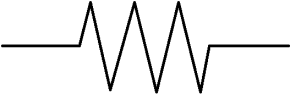
Electrical resistance is measured in units of Ohms. When resistance gets into values larger than 1000 ohms it may also be expressed in Kilohms or just ‘K’ for short (50K = 50,000 ohms). The symbol for resistance on electrical diagrams looks like this:
We’ll be measuring resistance with the Ohms function of our “multimeter” which can measure volts, current, resistance, and possibly other things too (frequency, capacitance, temperature with accessory probe, etc.). When the multimeter is set to the Ohms function, it may be referred to as an “ohmmeter.”
Plug the Meter Leads Into the Correct Meter Jacks
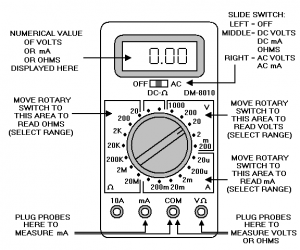
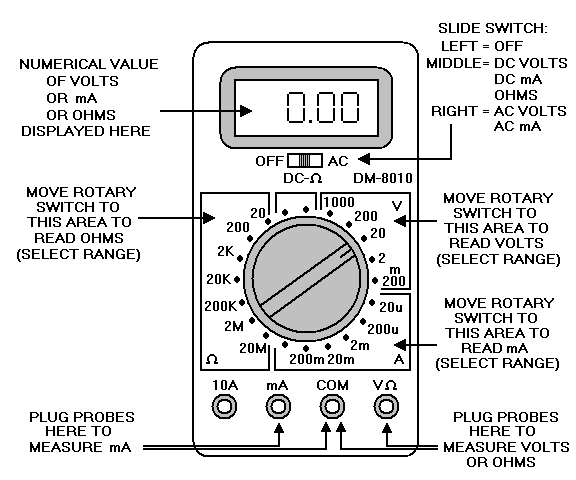
Shown below is a typical multimeter face layout. This is an actual meter Kele uses in our internal training classes. Note that your multimeter controls may be arranged somewhat differently or completely differently:
To read resistance, plug the black meter lead into the COM jack and plug the red meter lead into the V/ohm jack.
Set the Meter Selector to Ohms
The meter selector switch has different major areas for choosing whether you want to read voltage, current, resistance (ohms), or possibly other things. You need to move the selector switch to one of the positions in the Ohms area (left side of selector knob on our example meter).
Set Meter Range (Unless You Have an Auto-Ranging Meter)
Our example meter has different resistance ranges to choose from based on the maximum resistance you expect to measure. Always choose the smallest range that’s higher than the highest resistance you are expecting to measure. For example, if you are going to measure a resistance you think should be around 10K (10,000 ohms) then on the meter you would select the 20K range (because the 10K we want to check is higher than the next lower range which is 2K).
If you accidentally select a lower range than the resistance you are trying to measure, the meter won’t be damaged. You’ll get some kind of “overrange” indication on the display. This can vary from meter to meter. Sometimes it’s a row of horizontal dashes, sometimes it’s “OL” for overload, or maybe something completely different.
If your meter has an Auto-Ranging function you don’t have to worry about setting the range, the meter will figure it out for you. It will automatically step through the different ranges until it finds the lowest range that does not result in an over-range condition.
Auto-Ranging is very handy. The down side is that it can take the meter longer to display a final stable resistance reading because it has to trail-and-error each time to find the right range. A fixed-range meter manually set to the correct range will stabilize to a usable reading faster since it doesn’t have to experiment to find the correct range.
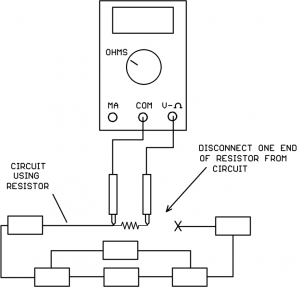
If the Resistor Is Connected In A Circuit, Disconnect At Least One End of the Resistor Before Taking A Measurement
If the resistor is connected in a circuit, at least one end of the resistor must be disconnected from the circuit before connecting the meter probes. If the resistor is left connected to other devices at both ends, you will be measuring the “equivalent resistance” of other circuit components in parallel with the resistor of interest. This will give a false reading that is lower than the actual resistor value.
It would also be a good idea to have the circuit powered down even though one end of the resistor is disconnected. The connected end of the resistor could be attached to a live voltage or current source and bad things could happen if the probes slipped.
Place the Meter Probes Across The Resistance To Be Measured
Remember to keep your fingers on the insulated probe handles, don’t touch the metal probe tips with your fingers. Your body is a resistor from hand-to-hand too, and if you grab both metal probe tips and try to read a high resistance value, your body resistance in parallel will introduce a measurement error.
If the display shows an over-range condition, just move the meter ohms selector to the next higher range and try again.
Special Notes On Temperature Sensor Resistance Measurements
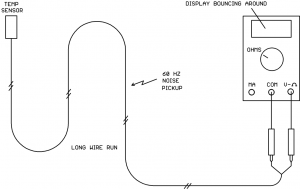
If you try to measure the resistance of a thermistor or RTD temperature sensor with a long wire run attached, you may find that the readings jump around on the display. This is caused by that long wire run acting as an antenna and picking up 60 Hz power line noise:
Some meters may have better noise filters than others, if you have more than one model meter available you might try them all to see which is better at noise rejection.
If the resistance value is jumping around, look for the minimum value that ever shows up on the display and the maximum value that ever shows up on the display. Chances are that the true resistance value will be approximately halfway between those two values.
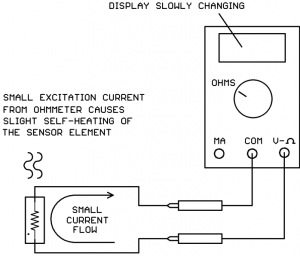
You might also notice that when you put the meter probes on the thermistor or RTD sensor, the resistance value starts to slowly move (up for RTDs, down for NTC thermistors). It’s unlikely (although remotely possible) that you have an unstable sensor, it’s more likely you are seeing the effects of self-heating in the sensor.
The ohmmeter passes a small current through the sensor resistance in order to measure it. This small current causes a slight heating of the sensor material. Since temperature sensors are specifically designed to give large resistance changes with temperature change, this self-heating shows up as a slow resistance change:
This is nothing to worry about and does not mean that the sensor is bad. The initial sensor resistance value (before self-heating takes effect) more accurately represents the temperature of the medium being measured by the sensor.
Temperature sensors with a small thermal mass and slow-moving media are more likely to exhibit self-heating effects than sensors with a large thermal mass and swiftly moving media. For example, a chip sensor sitting up in the air on two thin wires inside a wall-mount room housing will exhibit more self-heating effect than a duct sensor potted in the end of a metal tube placed in the moving air stream inside a duct.
Continuity Checks Using An Ohmmeter
Sometimes you simply want to know whether two points in a control panel or on a module terminal block are connected directly together. The ohmmeter is an excellent tool for doing continuity checks.
To perform a continuity check:
Make sure the circuit is powered off.
Place the ohmmeter probes on the two points to be checked.
If the resistance is less than 1 ohm, the two points are very likely directly connected.
Why wouldn’t the resistance read zero ohms if the points were directly connected? Because all conductors icluding the ohmmeter test leads have some electrical resistance. You can prove this by shorting the ohmmeter test probes directly together and observing the display, it will show a non-zero (but very small) resistance value.
Take-Away Points
If the resistance to be measured is mounted in a circuit, disconnect at least one end of the resistor from the circuit before measuring .
Noise pickup on long wire runs can make the resistance value jump around on the meter. Look for the lowest and highest displayed values and take the midpoint between the two as the true value. Try a different meter to see if it has better noise filtering.
Slowly changing temperature sensor resistance after connecting the meter is probably self-heating of the sensor element and not a bad sensor.
When taking continuity measurements with an ohmmeter, don’t expect to read 0.00 ohms across two connected points. Any value less than 1 ohm is a good indication the points are directly connected.
If you are involved in installing or troubleshooting HVAC systems, sooner or later you will be taking electrical current measurements. This tutorial will discuss the basics of how to take those current measurements.
Current is measured in units of amperes, usually abbreviated to simply “amps.” When working with small currents (less than 1 amp) it may be more convenient to describe current in “milliamps,” typically abbreviated as “mA.”
When you see the term “milliamp” or “mA” this means 1/1000 of an ampere. For example:
4 mA = 4/1000 amps = 0.004 amps
20 mA = 20/1000 amps = 0.020 amps
You might be measuring AC (alternating current) or you might be measuring DC (direct current) depending on the situation. AC current is constantly reversing directions whereas DC current is always flowing in the same direction.
Very likely you will be taking current measurements for one of two reasons:
Measuring how much current a load draws from its supply (amps or mA, AC or DC).
Measuring a 4-20 mA control signal value (always DC).
Amp-Clamp Ammeter Versus Multimeter
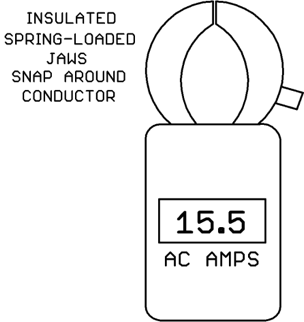
If a lot of your work is done on high-current AC power circuits, an “Amp Clamp” ammeter will be very useful. An amp clamp ammeter has spring-loaded jaws that simply snap around a conductor (no electrical connection required) and the built-in display (analog or digital) reads the amps of current flowing through the conductor:
Amp-clamp ammeters are convenient, but they have some limitations:
Typically an amp-clamp only measures AC amps; it can’t measure DC amps. (There are amp-clamps with a special kind of sensor known as a Hall Effect sensor which can measure DC amps, but these are not typical of most amp-clamps).
The range covered is usually high (hundreds of amps) so the accuracy on small amp values is poor.
If you are measuring relatively low value AC currents or DC currents, you will likely be using the amps/mA measurement function of a multimeter. A multimeter can measure other quantities besides amps but today we are just concentrating on amp/milliamp current measurements.
Shown below is a typical multimeter face layout. This is an actual meter Kele uses in our internal training classes. It’s a few years old but the functionality of the controls is the same as a modern multimeter. Note that your multimeter controls may be arranged somewhat differently or completely differently. No one likes to do it, but you might want to actually read your multimeter instruction manual if it hasn’t been thrown away/lost by now!
To read current, plug the black meter lead into the COM jack and plug the red meter lead into the mA or 10A jack. Using the mA jack, you can measure currents up to 200 mA on this particular meter. Other model meters may have higher mA ranges available. If you want to measure currents above 200 mA on this meter, you would move the red meter lead to the 10A jack.
Be aware of meter probe properties in the mA/amp mode!
When the meter probes are plugged into COM and mA/amps jacks, the meter’s internal resistance is very low, just a fraction of an ohm. In the current mode,the probe-to-probe path through the meter looks almost like a straight piece of wire!
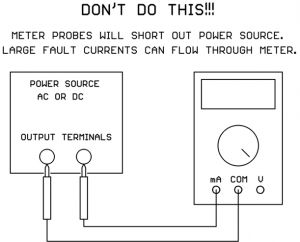
This has important implications. If you put the current meter probes across a power source, you will short out the power source! This makes sense if the probe-to-probe path looks like a straight piece of wire, right?
Many power sources have the capability to produce very large fault currents if their output terminals are shorted directly together. If you do this with your current meter probes, very large currents can flow through the meter!
Because it’s so easy to do this accidentally, most meter manufacturers put an internal fuse in series with the meter’s mA/amp jacks. In that case, hopefully the fuse will blow and protect the meter and the power source. Still, it’s a pain to open up the meter, locate the blown fuse, and replace it.
Some very cheap meters do not have a fuse in series with the mA/amp jacks. If you send large fault currents through one of these cheap meters, the foil on the circuit board will blow apart in lieu of a fuse, rendering the meter a candidate for the trash can. Hopefully your meter does have internal fuses on the mA/amps jacks.
Set the Meter Selector to mA
The meter selector switch has different major areas for choosing whether you want to read voltage, current, resistance (ohms), or possibly other things. You need to move the selector switch to one of the positions in the mA area (lower right area on our example meter). If you are measuring large currents (amps instead of mA) the meter selector may have a separate position for that, or it may still use the mA position since there is a separate jack for amps. Check your meter’s user guide. Our example meter above still uses the selector switch set to mA even though we are using the 10A jack for large currents.
Set Meter Range (Unless You Have an Auto-Ranging Meter)
Our example meter has different current ranges to choose from when using the mA jack based on the maximum current you expect to measure. Choose the smallest range that’s above the highest current you are expecting to measure. If you are not sure what range the current will be, start on the highest range and take a measurement. Then if you can move down to a lower meter range, it will give you better accuracy.
If you accidentally select a lower range than the current you are trying to measure, the meter won’t be damaged unless you put a really large fault current through that blows the fuse. Typically you’ll get some kind of “overrange” indication on the display. This can vary from meter to meter. Sometimes it’s a row of horizontal dashes, sometimes it’s “OL” for overload, or maybe something completely different.
If your meter has an Auto-Ranging function you don’t have to worry about setting the range, the meter will figure it out for you. It usually starts on the most sensitive range and, if it sees an over-range condition, moves to the next higher range etc. until it finds the most sensitive range that does not result in an over-range condition.
Auto-Ranging is very handy. The down side is that it can take the meter longer to display a final stable current reading because it has to trial-and-error each time to find the right range. A fixed-range meter manually set to the correct range will stabilize to a usable reading faster since it doesn’t have to experiment to find the correct range.
Set Meter for AC or DC As Needed
If you set the meter to read DC mA and put the probes in a circuit with AC current, the meter will read essentially zero mA (the readout might jump around the zero reading a bit).
If you set the meter to read AC current and put the probes in a circuit with DC current, the meter display will jump up momentarily then “coast” back down to essentially zero current over time.
So be careful – an incorrect AC/DC meter setting will give completely bogus results!
If you are probing a “mystery circuit” and you’re not sure whether the current between two points is AC or DC, you can try both settings on the meter to see which gives you a non-zero value.
It’s Time To Place the Meter Probes in the Circuit
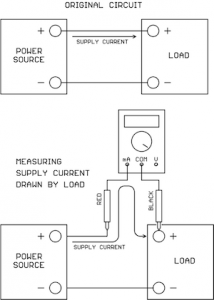
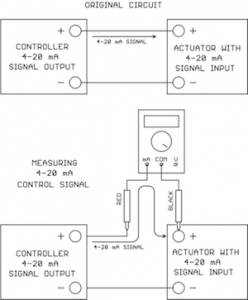
Now this is very important: to take a current measurement, you must disconnect an existing wire in the circuit and connect the meter current probes to take the place of the original connection.
The idea is that you must make the current that would normally flow directly between the two points take a detour and flow through your current meter on the way to its destination:
Measuring Supply Current
Measuring 4-20 mA Signal
Remember to keep your fingers on the insulated probe handles, don’t touch the metal probe tips with your fingers just in case the connection contains high voltage. If you have jumper wires with alligator clips, these can be handy for connecting the meter probes into the circuit hands-free.
We’ve shown the current meter connected at the load in the drawings above, but it could just as easily have been connected at the power source/signal source end instead.
In the case of AC current there is no polarity to worry about, the signal will always read positive on the display no matter which way the probes are placed.
In the case of DC current, the red probe should go on the more positive point and the black probe should go on the more negative point. But if you should get it backwards no harm is done, the meter will just display a negative current value, the magnitude of the reading will still be correct and you will know that the point with the black probe is actually the more positive point.
If the display shows an over-range condition, just move the meter current selector to the next higher range and try again.
Average-Reading Versus True-RMS AC current meters
Not all current meters are created equal when it comes to measuring AC current. There are two different measurement techniques in use.
“Average-Reading” AC current meters only give a correct reading if the AC current is a sine wave. Less expensive meters tend to use the average-reading measurement technique.
“True-RMS” AC current meters will give a correct reading no matter what the wave shape (does not have to be a sine wave). This technique is typically reserved for the more expensive meters.
True-RMS current readings are based on what heating effect the current would have if passed through a resistance. The fact is that many AC-to-DC power supplies draw their AC supply current in short, high-current pulses which are not a sine wave. Since the hookup wire has resistance, and fuses are designed to open based on heating of the fuse element, True-RMS current measurements are more meaningful for applying the correct wire size and fuse size on an AC-to-DC power supply input. True-RMS current meters are therefore preferable over average-reading current meters.
Final Thoughts
The most common complaint from the field is that a current meter is reading zero. The most common problems are:
The meter selector switch is not set for current (mA/amps).
The meter leads are not plugged in the correct jacks (COM and mA/amps).
The internal meter fuse is blown.
The meter’s AC/DC switch is set opposite to the type of current actually present.
If you live in the world of HVAC design/installation, sooner or later you’re going to need to take measurements on a circuit using a voltmeter (even if it’s “not your job,” we all know how that goes).
So we thought it would be a good idea to put together some basic instructions on using a voltmeter. Even if you’ve been using a voltmeter for years, there might be some tidbit of information here that you hadn’t thought about before. 🙂
Voltmeter or Multimeter?
These days you’d be hard-pressed to find a test meter that just measured Volts and nothing else. Everyone manufactures multimeters that measure volts, current, resistance, and possibly other things too (frequency, capacitance, temperature with accessory probe, etc.). But today we’re just going to concentrate on making voltage measurements with our multimeter.
Plug the Meter Leads Into the Correct Meter Jacks
This seems obvious, but this author has failed to do this many times. Shown below is a typical multimeter face layout. This is an actual meter Kele uses in training classes. It’s a few years old but the functionality of the controls is the same as a modern multimeter. Note that your multimeter controls may be arranged somewhat differently or completely differently. No one likes to do it, but you might want to actually read your multimeter instruction manual if it hasn’t been thrown away/lost by now!
To read voltage, plug the black meter lead into the COM jack and plug the red meter lead into the V/ohm jack.
Do not mistakenly leave the red meter probe in the mA or Amps jack and try to measure voltages between two points in a circuit. In the mA or Amps mode the meter leads essentially look like a direct connection and you will be shorting out the two measurement points in the circuit. Bad things can happen. Since we are discussing voltage measurements today, that’s all we’re going to say on the subject. You have been warned.
Set the Meter Selector to Volts
The meter selector switch has different major areas for choosing whether you want to read voltage, current, resistance (ohms), or possibly other things. You need to move the selector switch to one of the positions in the Volts area (upper right area on our example meter).
Set Meter Range (Unless You Have an Auto-Ranging Meter)
Our example meter has different voltage ranges to choose from based on the maximum voltage you expect to measure. Always choose the smallest range that’s higher than the highest voltage you are expecting to measure. For example, if you are going to measure 24V then on our meter you would select the 200V range (because the 24V we want to check is higher than the next lower range which is 20V).
If you accidentally select a lower range than the voltage you are trying to measure, the meter won’t be damaged, you’ll get some kind of “over range” indication on the display. This can vary from meter to meter. Sometimes it’s a row of horizontal dashes, sometimes it’s “OL” for overload, or maybe something completely different.
The only way you should damage your voltmeter from overvoltage would be if you exceed the maximum rating for the meter. That value should be in the instruction manual and it’s almost always printed on the meter face too. It’s pretty high, typically something like 750V or 1000V, values you will probably never encounter in HVAC work.
If your meter has an Auto-Ranging function you don’t have to worry about setting the range, the meter will figure it out for you. It usually starts on the most sensitive range and, if it sees an over-range condition, moves to the next higher range, etc. until it finds the most sensitive range that does not result in an over-range condition.
Auto-ranging is very handy. The downside is that it can take the meter longer to display a final stable voltage reading because it has to trial and error each time to find the right range. A fixed-range meter manually set to the correct range will stabilize to a usable reading faster since it doesn’t have to experiment to find the correct range.
Set Meter for AC or DC Volts As Needed
If you set the meter to read DC volts and put the probes on an AC voltage source, the meter will read essentially zero volts (the readout might jump around the zero reading a bit).
If you set the meter to read AC volts and put the probes on a DC voltage source, the meter display will jump up momentarily and then “coast” back down to essentially zero volts over time.
So be careful – an incorrectly set meter will make you think there is no voltage present when there really is.
If you are probing a “mystery circuit” and you’re not sure whether the voltage between two points is AC or DC, you can try both settings on the meter to see which gives you a non-zero value.
Place the Meter Probes on the Circuit Points To Be Measured
To make a voltage measurement, you do not need to disconnect anything in the circuit. You do that for current or resistance measurements (which we are not covering today).
Remember to keep your fingers on the insulated probe handles, don’t touch the metal probe tips with your fingers. You might know the voltage is supposed to be low (24V) but why take a chance in case you’re mistaken or there’s a short in the wiring?
In the case of AC voltage, there is no polarity to worry about, the signal will always read positive on the display no matter which way the probes are placed.
In the case of DC voltage, the red probe should go on the more positive point and the black probe should go on the more negative point. But if you should get it backward no harm is done, the meter will just display a negative voltage value, the magnitude of the reading will still be correct and you will know that the point with the black probe is actually the more positive point.
If the display shows an over-range condition, just move the meter voltage selector to the next higher range and try again.
Average-Reading Versus True-RMS AC voltmeters
Not all voltmeters are created equal when it comes to measuring AC volts. There are two different measurement techniques in use.
“Average-Reading” AC voltmeters only give a correct reading if the AC voltage is a sine wave. Most AC voltage signals we read in the HVAC world are sine waves (or very close) so this is typically acceptable. Less expensive meters tend to use the average-reading measurement technique.
“True-RMS” AC voltmeters will give a correct reading no matter what wave shape (does not have to be a sine wave). This technique is typically reserved for the more expensive meters.
Do Newbie Practice On Low Voltages
If you’re new to taking voltage measurements with a voltmeter, we recommend you start with a low-voltage source just to keep things really safe. A step-down transformer with a 24VAC secondary or a bench power supply with a low voltage DC output would be great.
Follow the recommendations above and taking voltage measurements with a multimeter should be second nature in no time at all!
Did you know that when you assemble power supplies, controllers, relays, transmitters, and all that other stuff into an enclosure for your control panel, there’s a rule in the NEC that requires your panel to be listed and labeled as an industrial control panel?
Article 409 of the NEC is devoted to the installation of industrial control panels, which are defined as an assembly of two or more components consisting of:
Power circuit components only, such as motor controllers, overload relays, fused disconnect switches, and circuit breakers;
Control circuit components only, such as pushbuttons, pilot lights, selector switches, timers, switches, control relays; or,
A combination of power and control circuit components.
Articles 100 and 110 of the NEC further insist on listed and labeled equipment where such safety standard exists. An informational note in Article 409 refers the installer to UL 508A as an example of a suitable safety standard for industrial control panels. Kele’s UL 508A panel shop can fulfill your needs for a listed and labeled industrial control panel. Send us those drawings in whatever format you choose, and we can help make your panel conform.
So what is UL 508A all about? It’s all about safety – safety from fire, and safety from personal injury. The standard stipulates everything from enclosure type to wire size. There’s a lengthy part about proper separation of power circuits from Class 2 circuits. There are standards that must be met for every part installed in the panel that is upstream of Class 2 circuits. There are labeling requirements for many different scenarios. There are requirements for overcurrent protection and short circuit protection. In sum, a UL 508A panel is a safe panel.
Why Kele? Our UL Panel shop is authorized by UL to list and label your panel as meeting UL 508A standards. Our staff is regularly trained, and a UL inspector makes sure that our work is up to snuff.
We have recently added an additional 1,800 square feet to our panel shop, for a total of 6,720 square feet.
This means we have the capacity to handle your largest projects.
See below for some pictures. We currently have 23 people on our Panel Team with over 150 years on combined experience in BAS/panel building. We’ve also added a new Panel Review Team that will inspect all panel drawings before the panels are moved into production to eliminate any issues or questions plus a Panel Shop Manager, Lisa Bennett, who will make sure your panel is built to spec, on-time and tested before it ships to you, ready to install.
Call Bennie Crowder today at 888-397-5353 or email us at panels@kele.com to get your control panel UL listed. We’ll build it up to the standard, test it, and ship it to you ready to install. Our normal lead time for building panels is 2 weeks or less plus there is an expediting option for quicker shipment. For more information on our panel shop, please visit http://www.kele.com/panel-shop/.
Repeat / NSTA Panel Assembly AreaCustom Panel Assembly AreaInspection / Pack Out Area
Selling a service is selling the intangible. You know, as a consumer, if you are getting great service from a business. You can feel it, but sometimes it’s hard to actually define. Many times, listening to a demand, a complaint, or a request is all that’s needed to provide great service. In product management circles, Voice of the Customer (VoC) is one of the most important drivers in product development. If we LISTEN really well, the solution has already been provided for us. If a customer says, “I wish you had a widget that would do this.” Or “I need a product to do this for me”. When you hear those statements, LISTEN, and take good notes.
Ascertaining VoC can be a challenge for many companies. How can you systemically listen to thousands of “I wish” or “I need” statements and boil it down to a working product development list? At Kele we actually utilize a very modern marketing department to help cultivate customer responses and needs. Using digital media and short surveys gives the product management team at Kele a gateway to thousands of customer voices and opinions. We sort through them quickly and this VoC gives us solutions to provide better products and better services to you the consumer. Of course it takes your participation in the surveys and you, our customer base, have been great about providing your preferences.
One example, is the Kele Water Detector (WD) family expansion project that is launching at the 2016 AHR Expo in Orlando. Kele has provided a legacy water detector device for over 20 years, and continues to serve a wide range of customers. We started to get “I Wish” responses from WD users like this:
I really like your WD product but I WISH you had a poly material (plastic) enclosure option.
I WISH it had a cable option that could bend around corners in the long sensor run.
We literally sorted through hundreds of survey responses. This form of VoC (your responses) helped shape the design requirements for the next generation of Kele water detectors. Our offering has expanded significantly. We also understood through VoC that our legacy WD product is a great product, and is still required by the industry. So many times, product launches involve a planned obsolescence of existing part numbers. In this case customers spoke, no obsolescence is planned, only expansion of a strong product legacy. So thank you for the feedback, we will continue to provide great customer service, and LISTEN.
In the financial world, compounding is a good thing, but in the contracting world, it can be your enemy. See if this sad tale we constantly hear from our customers sounds familiar.
Work is up, and you have a lot of parts to order. After tons of phone calls and Web searches, you locate the parts you need and place purchase orders with all the different sources. So far, so good. But then the parts start to rain in from everywhere. You’re getting multiple shipments because you bought from multiple sources. Most vendors today stock little or nothing, so each one sends what they can when they can. Meanwhile, you have to receive those parts, check them in, and decide what to do with them—taking time and effort you don’t have to spare, especially if you’re trying to do it on the job site.
And it just gets worse. You start to get partial invoices from all those compound shipments, dragging your accounting department into the chaos. And you pay the price for ordering from so many different sources—the freight on all those small shipments sure adds up, doesn’t it? We haven’t even gotten into multiphase projects or future orders. Multiply all this work by the number of projects you have going, and contractor compounding eats up your time and your resources and affects your bottom line.
Your skilled Kele support staff has the cure for contractor compounding. Below is a small sampling of the value added services that will be leveraged to save you time and money:
Lower Your Project Cost– we garner competitive rates for the parts you need, lowering your total project cost
Improve Your Material Plan Execution – We ensure material is easy to locate upon delivery to the job site to avoid unnecessary delays. Learn More
Improve Your On-Time Execution– We send material on a just-in-time basis.
Vendor Consolidation – We serve as the single-source solution for your vendor communications – one phone call to Kele relays relevant information to all suppliers.
A call to Kele at 877-826-9045 is one that will actually pay the good kind of dividends….just another way we “make it easy”!
Current transformers (CT) are simple and reliable devices which make it possible to make accurate measurements of alternating current flowing in a conductor without making any electrical contact. This characteristic makes the current transformer, or CT an invaluable tool for the power utility industry.
The principle of operation of a CT is the sensing of the magnetomotive force around a current-carrying conductor. The CT contains a high permeability magnetic core, and a multiple turn secondary winding. This secondary winding links all the magnetic flux generated in the core by the magnetomotive force (mmf) caused by the current in the primary conductor.
The CT therefore resembles other transformers. The goal in designing a CT is to approach the behavior of an ideal transformer, where the permeability of the core can be considered infinite; the resistance of the windings is zero, and both windings link exactly the same magnetic flux. To the extent these conditions are met, the transformer will have two properties:
The voltage per turn will be equal on both the primary and the secondary
windings, so that the ratio V (sec)/V (pri) = N (sec)/N (pri).
The net magnetizing current is zero, so I (pri) x N(pri) + I (sec) x N (sec)=0, or I (sec)/N(pri)= -I (pri)/N(sec)
It can be seen that an ideal transformer can be described by one number, the ratio N (sec)/N (pri). For the CT, N (pri) is usually 1, so that I (sec) = I (pri}/N (sec), or, as is usually written, I(pri)/N. (the negative sign can usually be ignored, unless the phase relationship between I(pri) and I(sec) is of importance in the measurement).
For most measurements, the CT secondary winding is permanently connected to a low value resistor, called the burden resistor. The voltage across this resistor is then
V= [I (pri)/N] x R. The value of R is determined by the maximum value of I (pri) to be measured, the number of secondary turns (N), and the full scale voltage of the measuring or recording device.
The value of R is then equal to (V x N) / I (pri). As an example, if V = 0.333 volts.
N = 5000, and I (pri) = 100 Amps, R will be16.65 ohms, and its full scale power dissipation will be 0.0067 watts.
It should be noted that a CT such as this one should never be operated with an open secondary winding. If this happens, and a current step is applied to the primary, the CT will briefly act as an N: 1 step up transformer, and a dangerous voltage surge will result. For applications where the burden resistor may be switched or removed, a permanently connected bi-directional zener diode (10 volts is usually OK) will eliminate the hazard.
Construction of the CT is determined by the application. For permanent installation a silicon iron toroidal core, usually offers the combination of high accuracy and small size at a reasonable cost. The main disadvantage is the necessity for interrupting the circuit during installation or removal.
To overcome this problem, several openable designs are in use. Some use tape wound cut cores mounted in a hand-operated clamp, so they can be installed with one hand. Other designs use plastic or metal clips to hold the core structure together. Yet another solution might be to make the core interleaving to minimize the air gap. All of these approaches require careful design and construction to maintain the integrity of the magnetic flux path, i.e., they do not introduce significant air gaps into the flux path.
The accuracy of a CT is of course affected in by turn count errors, and burden resistor tolerance. Other errors, which affect the phase error between I (pri) and the voltage across the burden resistor. This is caused by the fact that the CT is not an ideal transformer, but has a finite inductance, and a non-zero winding resistance (and burden resistance). This is the reason accuracy is a bigger problem either opening CT designs: the added air gap, no matter how small, lowers the inductance.
The phase error is generally not significant where only the amplitude of the current is important, but matters significantly when the CT is used in measuring power, when voltage and current signals are multiplied together. Accordingly, applications requiring accurate power measurements should use a CT with low phase error. For highest accuracy, a non-opening nickel iron alloy toroidal core provides the most inductance, and therefore the least error.
There is one disadvantage to the CT concept: The presence of a DC component in the current being measured will tend to saturate the core, and seriously affect the accuracy.
For higher frequency applications a ferrite core can be used. This makes the CT configuration usable up to 100 kHz and possibly more. This makes possible CT devices, which can be used on high frequency power conversion equipment.
The advantage of the CT can be summarized:
Isolation from circuit under test
High accuracy over a wide current range
No adjustments or recalibration required
Passive device – no power source required
Immune to overloads
Sam Seyfi Magnelab, Inc.
April 2010 – Originally published on www.magnelab.com. Click here for a PDF copy.