Contributed by Functional Devices
Wiring a multi-tap transformer can seem confusing at first glance, especially when you’re staring at a bundle of color-coded wires. It’s a common question we hear from customers: “Which wires do I connect?” The good news is, once you understand your power system setup—whether it’s a Delta or Wye configuration—and know how to measure voltage, connecting our multi-tap transformers becomes a simple, straightforward process.
This guide explains the basics of Delta and Wye systems, how to identify the correct wires, and how to safely connect them to Functional Devices transformers using just a multimeter and a little know-how.
Before we get started, here’s a very important reminder: Always make sure to properly insulate unused primary tap wires.
Answers at a Glance
Q: What’s the first thing I need to know before wiring a transformer?
A: You need to know your incoming power configuration—either Delta or Wye (Y)—and which wires supply the correct voltage for your transformer tap.
Q: Why are there so many wires on a multi-tap transformer?
A: Multi-tap transformers have multiple voltage tap options, each corresponding to different input voltages. The extra wires allow you to select the correct voltage for your application.
Q: How do I identify which wires supply which voltage?
A: Use a multimeter to measure the voltage between pairs of wires in your system. This will help you match the correct input wires to your transformer taps.
Q: Does it matter which phase connects to which wire on the transformer?
A: No, when connecting two phases, it doesn’t matter which phase goes to which transformer wire.
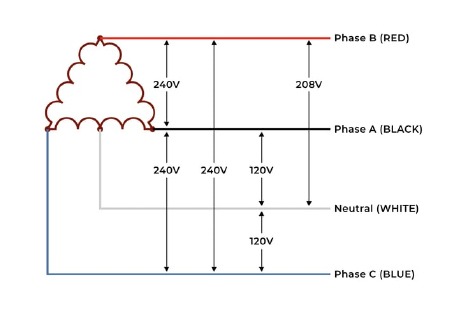
Delta Configuration
WYE Configuration
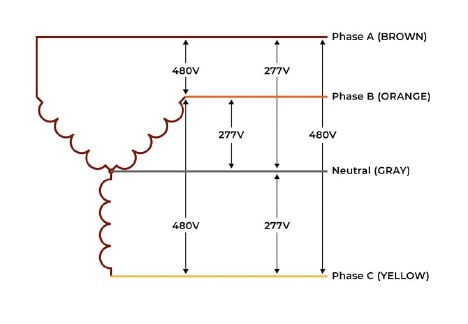
An easy way to remember this is that the delta configuration looks like a delta symbol, and the wye configuration looks like the letter “Y”. The wye configuration also looks a bit like a flux capacitor from Back to the Future if that helps. Please note that not every delta or wye set up will have these voltages, these are just two examples. The main point to get from this is that your incoming power typically has three phases and one neutral. This allows each configuration to provide two to three different voltages. Usually, between neutral and a phase is a smaller voltage, and between two different phases is a larger voltage. Knowing which voltage is between which two wires is key when installing one of our multi-tap transformers.
Measuring Wire Voltage
If you don’t know which wire is which, you can always measure it using your multimeter. Once you know which two wires have the voltage for the tap you want, simply connect one power wire to the wire on our transformer with the voltage tap you want, and the other power wire to the wire on our transformer labeled “Comm”. Then separately insulate each of the unused wires. It’s that easy!
For the sake of clarity let’s do some examples. Take a look at the wiring diagram for our TR50VA015:
 Let’s say you want to connect the delta configuration to our TR50VA015. If you wanted to connect 120 Vac to the primary, you would connect your neutral (WHITE) to the transformer Comm (Blk). Then you would either connect phase A or C (BLACK or BLUE) to the 120 Vac tap on the transformer (Wht). If you wanted to use 240 Vac on the primary, you would take any two of the three phases and connect them to the orange and black wires on the transformer. It doesn’t matter which phase goes to which wire.
For the wye configuration, you would connect your neutral (GRAY) and any phase to the black and brown wires on the transformer for a 277 Vac primary. Similarly, any two phases on the wye configuration should be connected to the gray and black wires on the transformer for a 480 Vac primary.
Hopefully this clarifies how to wire a Functional Devices transformer. As always, if you’re still confused, feel free to contact us! And check out our offering of Functional Devices Current Transformers.
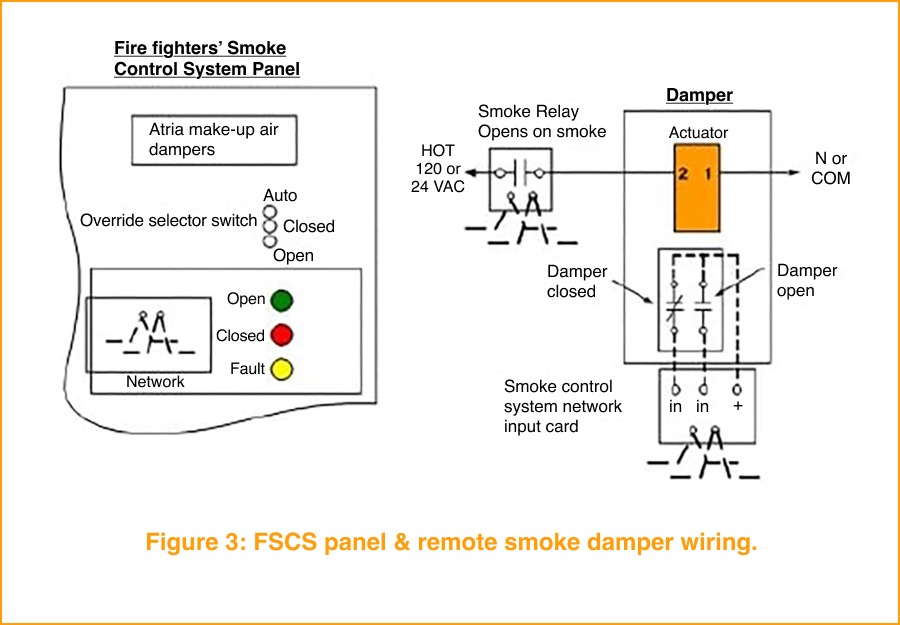
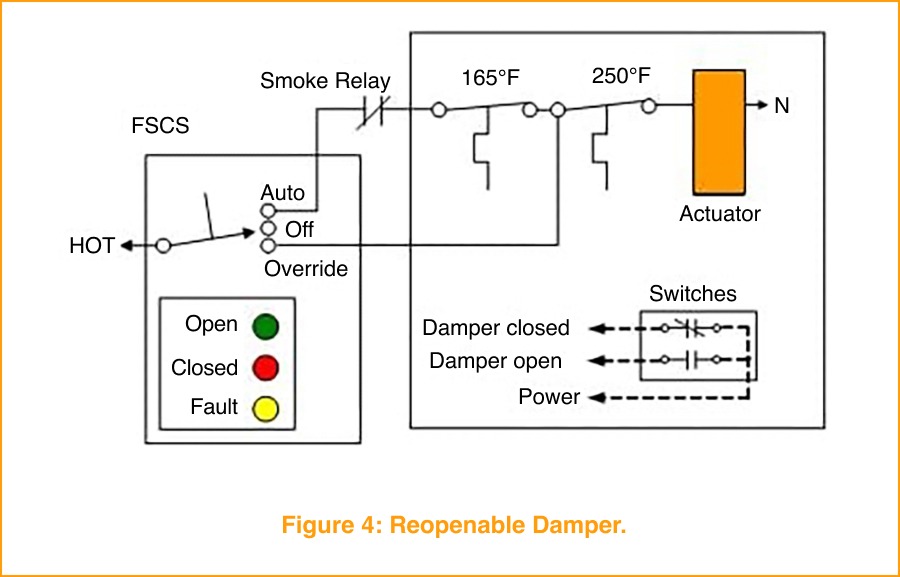
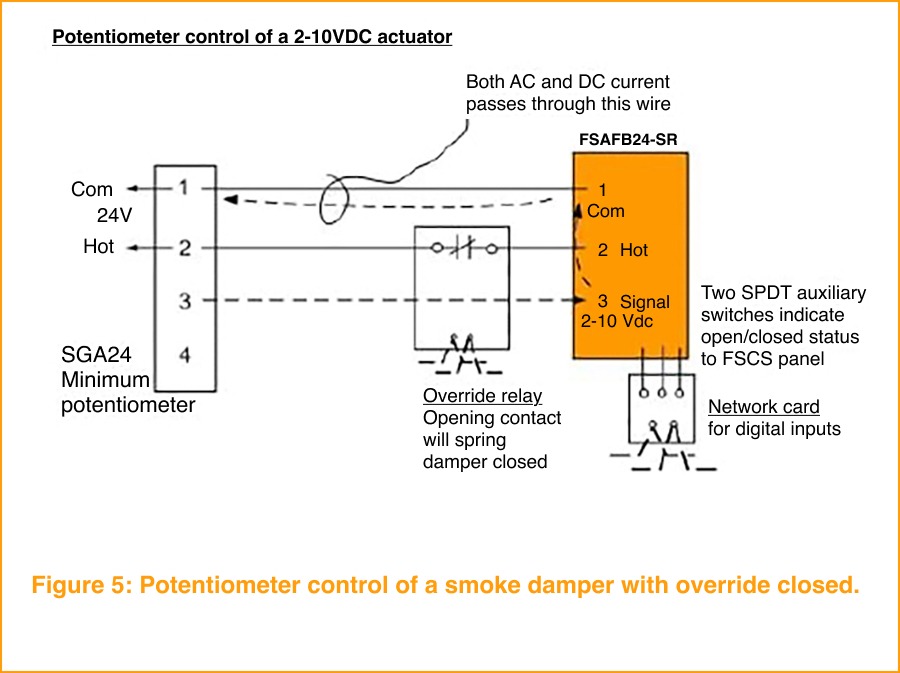
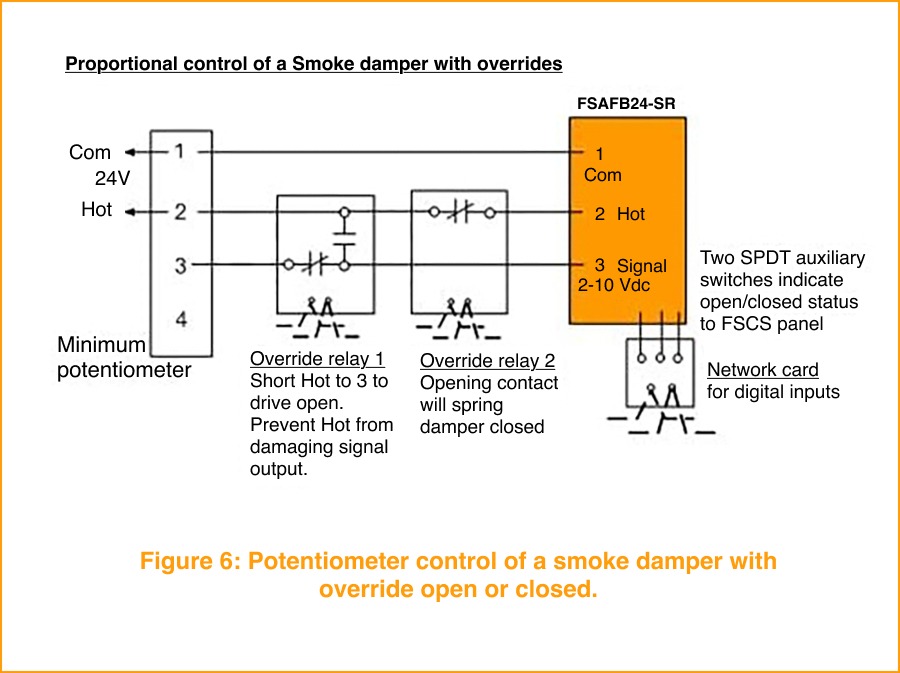


 Modern high-rise buildings feature staircases designed to protect you in case of a fire. Staircases have a higher fire rating than the rest of the building, which means the stairs aren’t as likely to catch fire. Additionally, stair pressurization systems utilize clean air from outside to push smoke (which naturally rises) back onto the floors. This helps to make sure the smoke doesn’t fill up the stairwell, meaning easy breathing on the way down.
 How Stairwell Pressurization Systems Work
 Maintaining Optimal Performance Through Advanced Sensing and Control Solutions
 Excess heat and high relative humidity can compromise the performance and longevity of sensitive IT equipment. Studies from major data center operators, including
  Consistent and balanced airflow is critical to maintaining thermal stability in data centers. Poor air velocity control can lead to hot spots, reduced cooling efficiency, and overworked HVAC systems—compromising both energy usage and equipment health.
 In high-density data centers, even small fluctuations in airflow or static pressure can impact cooling efficiency, energy use, and equipment reliability. Monitoring differential pressure across air handling units, filters, and ductwork is essential for maintaining stable environmental conditions and ensuring clean, well-balanced airflow to server racks.
 Data centers rely heavily on liquid-based cooling systems to manage the high thermal loads generated by dense server environments. Ensuring consistent coolant flow—and the ability to service components without shutdown—is vital to maintaining uptime and preventing thermal events.
 Benefits of HVAC Controls in Data Centers


